Practical Storage Choices for System Design: Performance, Durability, and Cost - What Every Engineer Should Know

Storage is a core system-design decision that directly shapes performance, durability, and cost. Choosing the right storage type — from in-memory caches to persistent block stores and object archives — influences latency, throughput, recovery behavior, and long-term operational expenses. Engineers who understand the trade-offs can align storage choices to workload characteristics, failure models, and budget constraints, avoiding common pitfalls that cause performance bottlenecks or costly redesigns.
This article gives a practical, decision-oriented overview: what each storage class is, the key properties that matter for system behavior (latency, IOPS, throughput, consistency, persistence, and cost per GB), concrete examples of where each type is used in real systems, and actionable guidance to apply today when designing or evaluating storage for new and existing systems. Read on to quickly match storage technologies to workload patterns, anticipate failure and recovery implications, and make choices that balance performance, durability, and total cost of ownership.
A storage choice isn’t just where bytes live — it shapes latency, throughput, recovery time, operational costs, scalability, and user experience. Engineers who pick storage without mapping requirements to properties often overpay for capacity, under-provision performance, or face surprising durability or consistency gaps.
Why Storage Matters for System Design, Performance, Durability, and Cost
Storage refers to systems and media used to persist data so it survives process restarts and returns later. Storage decisions determine how fast you can read and write, how much you can store, how reliably data survives failures, and how much you pay.
Short Examples:
If a payment processor uses a slow disk for transaction logs, transaction latency increases and customers see slow responses.
Using object storage for frequently updated small records can increase cost and complexity (object stores optimize for large immutable objects).
Key Links Between Storage and System Properties
Storage choices are tightly linked to system properties in several ways. Performance characteristics such as read/write latency and maximum throughput directly influence how quickly requests are handled and how efficiently background jobs run. Durability describes the probability that written data will survive hardware, software, and operational failures, and it often governs replication and protection strategies. Cost is driven by storage media, replication schemes, and access patterns (reads versus writes), all of which affect monthly and operational expenses. These factors lead to design trade-offs; higher durability and availability typically require replication or erasure coding, which increases cost and can add write latency. A quick taxonomy helps clarify options; block storage exposes raw storage volumes (blocks) to a host, leaving metadata management to the host filesystem or database—common examples are virtual machine disks or SAN volumes. File storage provides a filesystem interface with directories and files over a network or local disk, as seen with NFS, SMB, or network-attached storage appliances. Object storage keeps data as objects with metadata and identifiers in a flat namespace, accessed via APIs (usually HTTP), exemplified by S3-compatible systems.
Quick Taxonomy: Block, File, and Object Storage Definitions
Block storage: Presents raw storage volumes (blocks) to a host. The host filesystems and databases manage metadata. Example: virtual machine disks or SAN volumes.
File storage: Provides a filesystem interface (directories, files) over a network or local disk. Example: NFS, SMB, or a network-attached storage appliance.
Object storage: Stores data as objects with metadata and identifiers in a flat namespace, accessed via APIs (usually HTTP). Example: S3-compatible systems.
Short Examples:
Block storage: You attach a 500 GB block volume to an instance, format ext4, and mount it to /data.
File storage: Multiple servers mount the same NFS export to share files among app servers.
Object storage: Application uploads user photos as HTTP PUT to an object store and retrieves them by object key.
When to Prefer Each:
Block Storage: Consider block storage for Databases, virtual disks, performance-sensitive workloads needing filesystem control or low-latency random IO.
File Storage: Consider file storage for shared configuration, home directories, build artifacts where POSIX semantics matter.
Object Storage: Consider object storage for backups, logs, large binaries, media, and immutable artifacts accessed over HTTP.
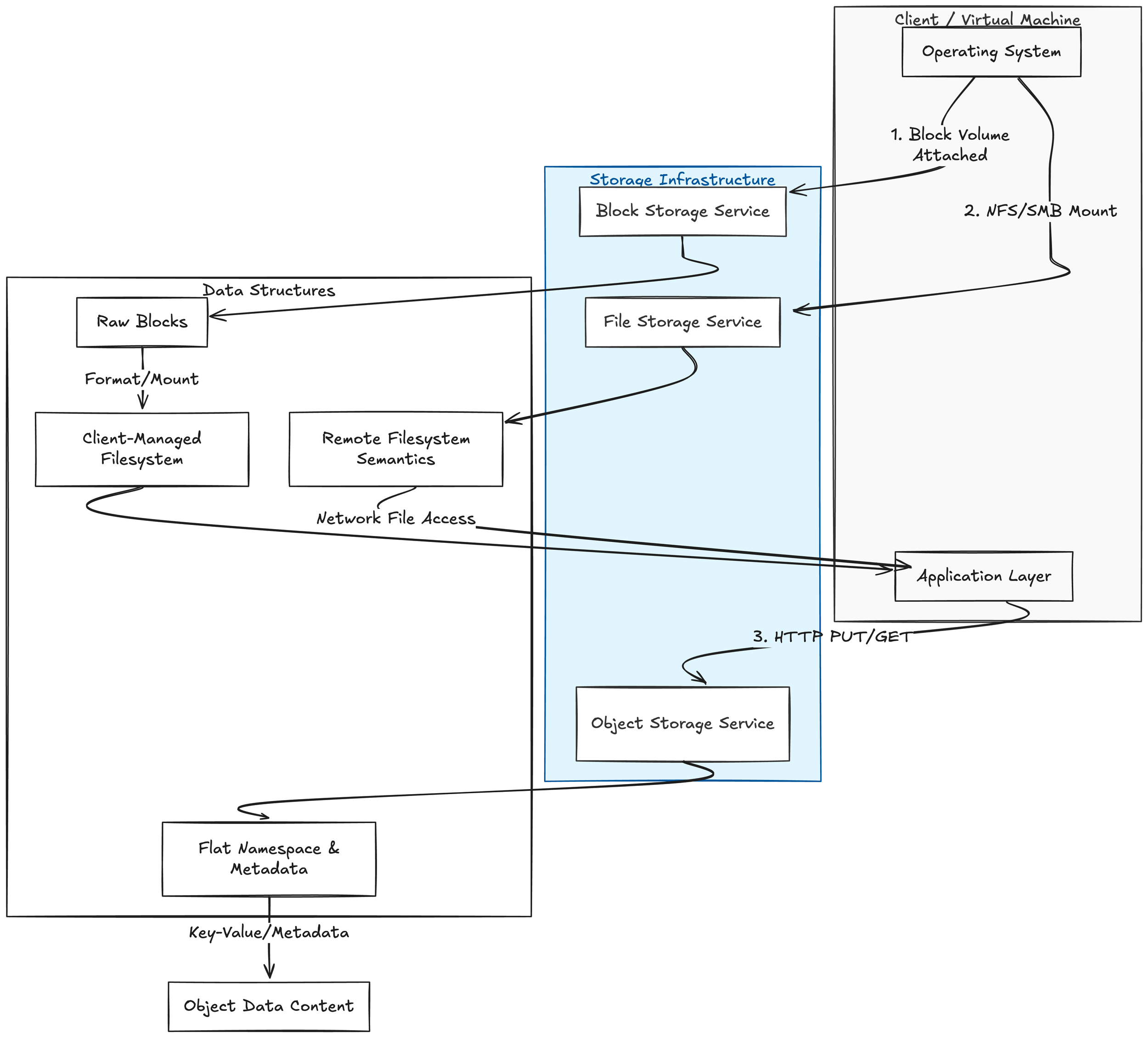
Storage Infrastructure relationships to the client side and their respective datastructures.
Key Storage Properties
Capacity: The amount of data you can store (e.g., gigabytes, terabytes). Example: a 2 TB block volume holds up to 2 TB before expansion is needed.
Throughput: The volume of data transferable per second, typically measured in MB/s (megabytes per second). Example: streaming backups require high sequential throughput — e.g., 200 MB/s.
IOPS (Input/Output Operations Per Second): Count of discrete IO operations per second. Small random reads/writes depend on IOPS. Example: a database doing many small reads may require thousands of IOPS.
Latency: Time between issuing an IO and its completion, measured in milliseconds (ms). Example: <1 ms latency for NVMe vs 5–20 ms for spinning disks; affects request-response times.
Durability: Probability that stored data will not be lost (often expressed as "nines", e.g., 11 nines). Example: object storage may promise 99.999999999% durability through multiple replicas/erasure coding.
Availability: Fraction of time the storage is accessible (e.g., 99.9%). Example: a storage service with 99.95% availability means potential downtime of ~4.38 hours/year.
Consistency: Guarantee about reads after writes. Definitions vary:
Strong consistency: After a successful write, future reads always see that write.
Eventual consistency: Reads may temporarily return older data, but the system converges. Example: Many object stores are read-after-write
Real-world Mapping: Storage Type Usage
Understanding storage types is most useful when you map them to common solution engineering use cases. Below are typical storage technologies and where engineers usually deploy them in production systems.
Block storage (SAN, cloud block volumes)
Primary use: VM disks, databases, and any workload that expects a raw block device.
Example workloads: Transactional relational databases (PostgreSQL, MySQL), high-performance NoSQL that uses a block device for its data files, virtual machine images.
Why it fits: Low-latency IO, high IOPS, fine-grained control over filesystem or database-level caching and journaling.
Considerations: Requires a filesystem or DB layer on top, smaller object-level metadata features, snapshot and replication are typically at volume-level.
File storage (NFS, SMB, cloud file services)
Primary use: Shared directories, home directories, content repositories, build artifacts, and some legacy applications.
Example workloads: CI/CD artifact stores (where many agents read/write files), shared configuration, clustered applications expecting a POSIX filesystem.
Why it fits: POSIX semantics, easy sharing between multiple clients, familiar tooling.
Considerations: Scaling metadata performance and locking, potential NFS/SMB consistency caveats, less suited for extremely high IOPS single-file workloads.
Object storage (S3-compatible)
Primary use: Backups, archives, static assets, large binary artifacts, event logs dumps, ML datasets, and data lakes.
Example workloads: Storing container images and build artifacts, application logs aggregated to S3, long-term backups, immutable archived snapshots, web assets (images, videos).
Why it fits: Scalable capacity, cost-effective for large datasets, rich lifecycle policies, built-in versioning and durability models.
Considerations: Eventual consistency patterns for some operations, no POSIX semantics (objects vs files), access is via APIs (HTTP/SDKs), smaller object counts and metadata operations can be expensive.
Key-value stores (Redis, Memcached)
Primary use: Ephemeral caches, session stores, leader election, rate limiting, small fast lookups.
Example workloads: Caching DB query results, storing distributed locks or counters, user session data in web apps.
Why it fits: Ultra-low latency, in-memory speed, simple get/put semantics.
Considerations: Durability varies (Redis persistence modes), memory cost, dataset size constraints; often used with persistence offloaded to more durable stores.
Log-structured stores and commit logs (Kafka, Pulsar, distributed append-only logs)
Primary use: Event streaming, durable message buffers, change-data-capture (CDC), ordered event storage.
Example workloads: Event-driven architectures, stream processing pipelines, ingesting high-throughput telemetry or logs before downstream processing.
Why it fits: Ordered append-only semantics, retention and replayability, high-throughput ingestion with predictable performance.
Considerations: Retention policies manage storage size, not a replacement for long-term cold storage; consumers need to handle replays and offsets.
Relational databases (RDBMS)
Primary use: Structured transactional data with complex queries and strong consistency needs.
Example workloads: Billing systems, user account stores, transactional business logic.
Why it fits: ACID guarantees, mature tooling for backups/cloning, rich query capabilities.
Considerations: Scaling write throughput can be hard (sharding, replicas), backup strategies matter (point-in-time recovery), storage choice (block vs managed cloud service) affects operations.
Distributed NoSQL stores (Cassandra, DynamoDB, HBase)
Primary use: Wide-column or document workloads needing horizontal scale and high write availability.
Example workloads: Time-series data, user activity logs, metadata stores for large-scale services.
Why it fits: Linear scalability, partition tolerance, multi-region replication options.
Considerations: Consistency models vary (tunable), compaction and tombstone behavior affects storage usage and performance.
Backup and archive storage (tape, cold object storage tiers)
Primary use: Long-term retention, compliance archives, disaster recovery snapshots.
Example workloads: Monthly/yearly compliance backups, cold backups of datasets, disaster recovery vaults.
Why it fits: Low cost per GB for infrequently accessed data, long retention, regulatory compliance.
Considerations: Retrieval latency and cost, validation and periodic restore drills, secure offsite copies, immutable/air-gapped options.
Local ephemeral storage (instance-local SSD/HDD)
Primary use: Scratch space for temporary processing, caches, ephemeral build workers.
Example workloads: Container build caches, temporary indexing jobs, local processing of streaming batches.
Choosing the right storage option depends on your workload, performance needs, budget, and operational preferences.
Final Thoughts
Object storage is ideal for large-scale, durable, cost-effective storage of unstructured data (backups, archives, media, analytics). It scales massively and offers metadata-driven access but is not optimized for low-latency block I/O.
File (shared) storage provides familiar POSIX semantics for multiple clients and works well for lift-and-shift applications, home directories, and content collaboration. Performance and cost vary by implementation and tiering.
Block storage delivers low-latency, high-throughput raw volumes for databases, virtual machines, and performance-sensitive applications. It’s the most flexible for fine-grained I/O control and filesystem choice.
Next Steps to Learn More
Identify common workloads and map them to storage characteristics (latency, throughput, IOPS, durability, consistency, cost).
Run small proof-of-concept tests using representative data and workloads to measure real performance and behavior under load.
Experiment with storage tiers and lifecycle policies to understand cost-performance tradeoffs (e.g., hot vs. cool/object-archive tiers).
Review backup and disaster recovery options: snapshot frequency, retention, cross-region replication, and restore procedures.
Evaluate security and compliance requirements: encryption at rest/in transit, IAM controls, audit logging, and data residency.
Consider integration and operational factors: backup tools, monitoring, automation (IaC), and vendor lock-in risk.
If you’d like hands-on guidance, we can help design POCs, size storage tiers, and build an operational runbook tailored to your environment. In our next post, we will dive into block storage—how it works, performance characteristics, provisioning strategies, and best practices for databases and VMs.